Visual Schedule For Students With Autism


Picture the ninety seconds that decide a school morning. The bell has rung, the room is tipping toward the carpet for circle time, and one student has not moved. He is not being defiant, and not lost in thought. He simply cannot see what comes next, and the not-seeing has become its own small emergency. I have watched versions of this moment in classrooms and at kitchen tables, and what strikes me is how ordinary it is — and how completely a strip of laminated card can change it. A visual schedule for students with autism turns the invisible sequence of the day into something a learner can look at, predict, and, in time, run without being told. Let me say what I mean by that, because the phrase gets used loosely, and because the evidence for these tools is rather better than the guides teaching them let on. This guide covers what a visual schedule is, why it works, the full range of types, how to build one, how it travels between classroom and home, the digital-versus-printable question, and the part almost nobody teaches: what to do when a schedule fails, and how to fade it toward independence.
What Is a Visual Schedule for Students With Autism?
A visual schedule uses objects, photographs, icons, or words to show the sequence of upcoming activities, giving a learner the predictability that lowers anxiety and, over time, builds independence.
That is the whole idea in one sentence, and it is worth slowing down on it. The four terms — objects, photographs, icons, words — are not a random list. They are a ladder of abstraction, running from the most concrete thing a learner can hold to the most symbolic thing they can read, and choosing the right rung is most of the work. A visual schedule for students with autism is, at bottom, a way of moving the sequence of the day out of the adult's head, where the student cannot check it, and onto a surface the student can.
Who is it for? Primarily special-education teachers and paraprofessionals, who carry the logistics of a classroom where every transition carries a small risk of derailment. A strong secondary audience is parents building the same predictability into mornings, homework, and bedtime. And the tool is not age-bound: visual schedules for students with disabilities are used across the full span from the earliest years to young adulthood, a point I will return to with the evidence behind it.
Here is the frame I want to set before going any further, because it changes how everything downstream reads. A schedule is not a lever for making a child comply. It externalizes the day so that the student holds the map. The autonomy is the point. As Autism Little Learners puts it, "visuals stay still. They wait until the brain is ready" — which is a rather good description of what a well-made schedule does that a spoken instruction cannot. For more on this way of thinking about autism and learning, you can explore more education and autism resources.
Why Do Visual Schedules Work for Students With Autism?
Visual schedules work by making the day predictable — and predictability lowers anxiety, supports understanding, eases transitions between activities, and grows a learner's independence.
That is the snippet version. The longer version is where this guide earns its keep, because almost every page you will read on this subject asserts that schedules work and then declines to show you the evidence. So let me put it on the table plainly. The most recent national systematic review — the 2020 report from the National Clearinghouse on Autism Evidence and Practice — classifies visual supports, the category that includes visual schedules, as a focused-intervention evidence-based practice. That classification rests on 65 articles — thirty-four gathered in the 1990–2011 review period and thirty-one more between 2012 and 2017, set out in the report's own Table 3.1. And the accompanying implementation guidance from AFIRM reports the evidence as effective across the entire zero-to-twenty-two age span, with studies in every band from early intervention through young adulthood. That is a far sturdier foundation than "in my experience, they help."
Why should predictability do so much? Two mechanisms, both worth naming. The first is regulation. When a student can see that the hard thing is followed by a preferred thing, and that the preferred thing is really coming, the background hum of what now? quiets down. Autism Little Learners compresses the chain nicely: "Predictability creates regulation. Regulation creates safety. Safety creates learning." The second mechanism is quieter and more practical. A visual schedule is a channel the student can re-check without needing an adult. As Reading Rockets puts it, schedules "assist with comprehension, providing another channel for learning, and are easily accessible should a student need to be reminded." The same source notes that they are "an important tool in reducing anxiety in students with ASD, while teaching flexibility." A spoken instruction is gone the instant it is said. A picture waits.
Do Visual Schedules Work on Their Own?
Here is where I want to be honest in a way the ranking pages are not, because the honesty turns out to be the useful part. A 2025 review by Mouzakes and Thompson in Behavioral Interventions re-examined transition interventions and found that the studies reviewed provided insufficient evidence that the visual-schedule component alone drove the improvements. Note the shape of that finding, because it is easy to misread: it is not that schedules were tested alone and failed. It is that they are almost never tested alone. Schedules, the authors found, are typically presented alongside other treatment components that have documented efficacy of their own, and few studies have pulled the package apart to see which piece is doing the work.
I find that this reads as bad news for about a paragraph, and then reads as the most useful thing in the literature. It means the schedule is not a magic object; it is a scaffold, and a scaffold only helps someone who is being taught to climb. That reframes the sections below. The build matters, the teaching matters, and — the part I will end on — the systematic fade toward independence is not an afterthought you get to if there is time. It is the mechanism that makes the whole thing succeed. If your wider goal is building daily-living independence, this is the hinge the schedule turns on.
Types of Visual Schedules (With Examples)
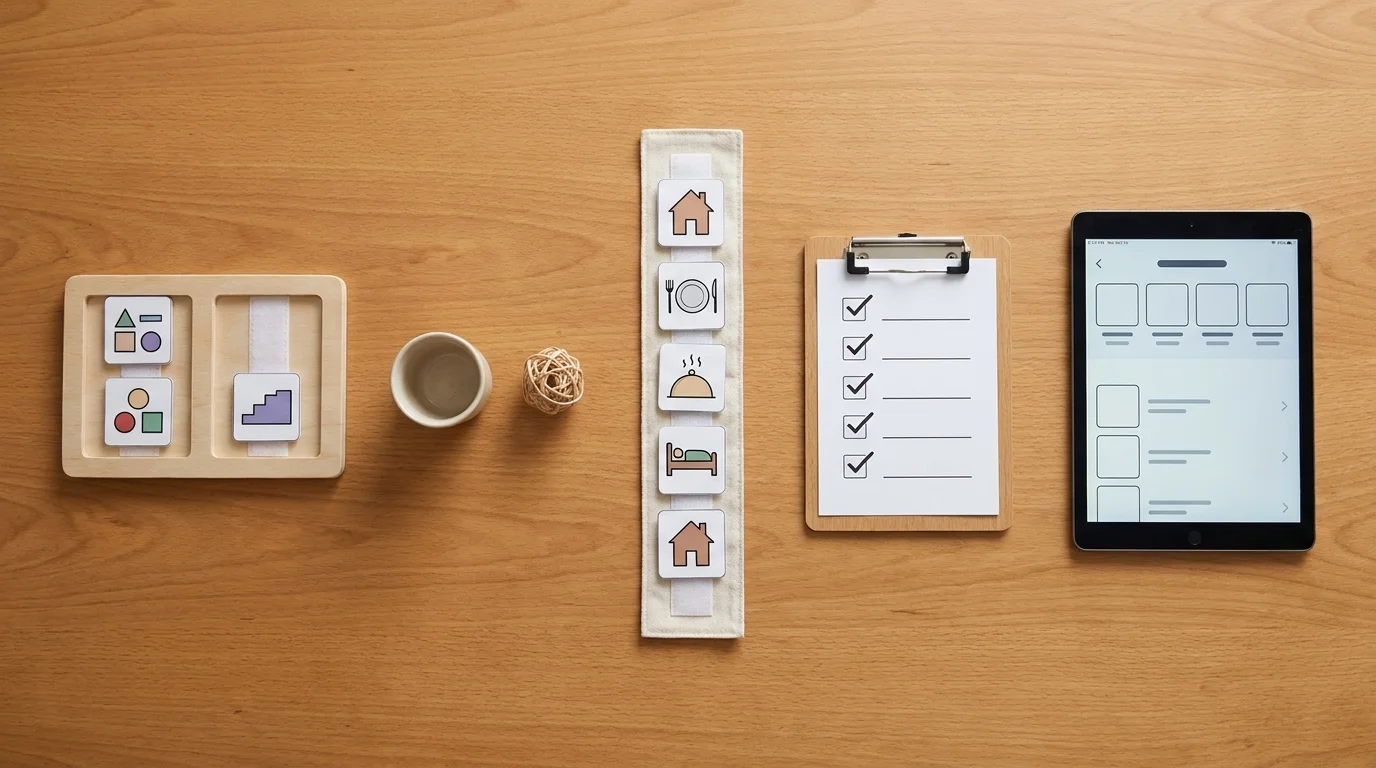
There is no single "visual schedule." There is a family of them, and the useful way to order that family is by how abstractly the learner can represent the day. Match the representation to the student's comprehension level. Below, simplest to most abstract.
First-Then Boards
The simplest form: two slots, "first" and "then." First work, then break; first shoes, then park. It reduces the entire future to one demand and one payoff, which is exactly what a learner needs when a whole strip of icons would overwhelm. This is the earliest, most concrete tool, and it is often where a nervous introduction should start.
Object Schedules
Here the schedule is made of real or miniature objects — a cup for snack, a small ball for the gym — that the student can pick up and carry to the activity. Objects sit below pictures on the abstraction ladder, which makes them right for pre-symbolic or very early learners who do not yet reliably read a photograph as standing for a thing.
Picture & Photo Schedules
Icons or photographs arranged in sequence: the classroom workhorse, and the form most people picture when they hear "visual schedule." Photos suit learners who need a literal image of their backpack, their teacher; line-drawn icons suit those who can generalize. This is the form that maps onto the elementary years.
Written Checklists & Planners
For students who read, a text list does the same job with less bulk and more dignity — a planner looks like what everyone else uses. Checklists carry an upper-elementary through secondary learner into the territory of ordinary adult organization, which is, after all, where we are trying to arrive.
Digital Schedules
App- or tablet-based schedules that travel in a pocket and prompt discreetly. They come into their own for older students building self-management and independence, and I give them their own section below, so I will keep the note here short: the medium is not the point, the fit is.
How to Create a Visual Schedule, Step by Step
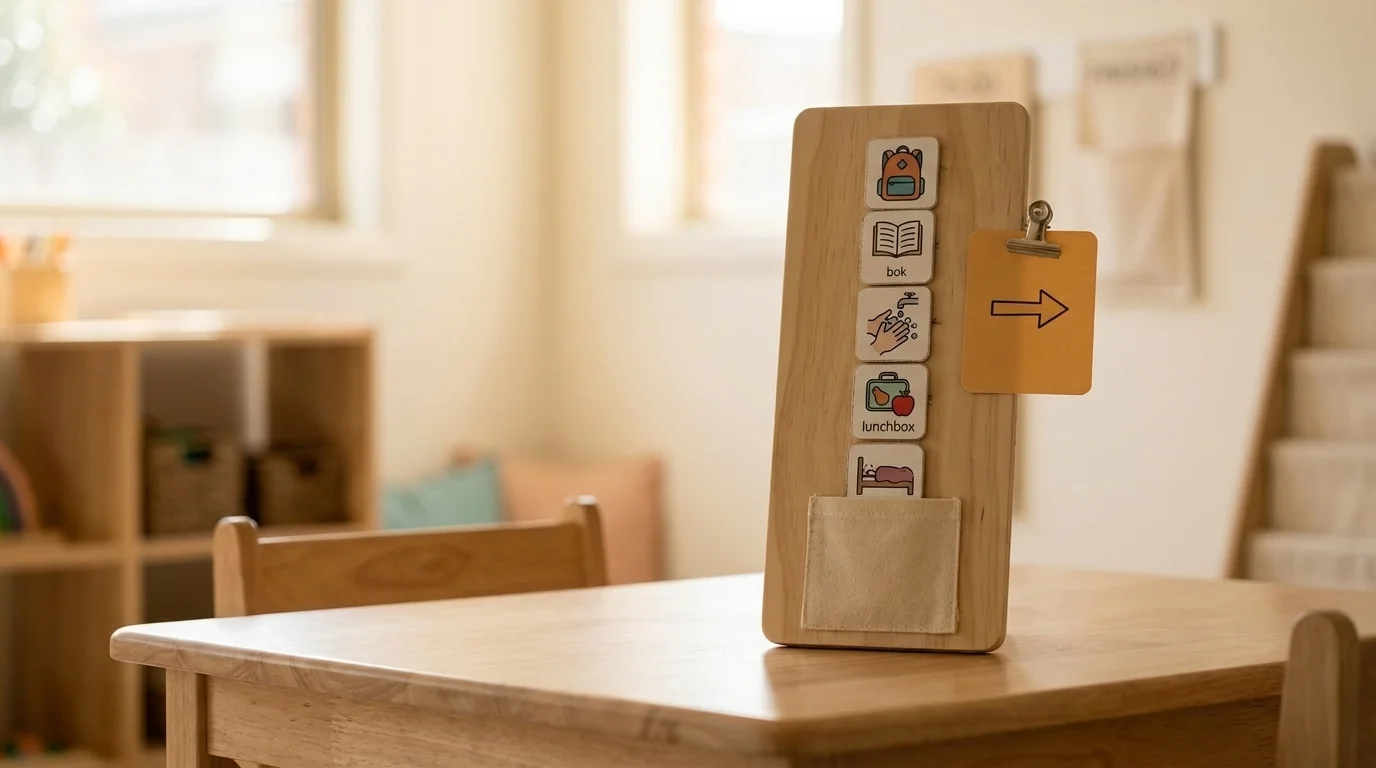
The build is less about craft than about a handful of decisions made in the right order. Here is the sequence I would teach.
- Match the representation to the learner's comprehension level. This is the decision everything else depends on. Object, picture, or written — pick the rung the student is actually standing on, not the one you wish they were.
- Choose the medium and sequence the tasks. Start short, and lay the day out in the order it will actually happen.
- Make it portable. A schedule that lives on one wall helps at one wall. Put it on a clipboard, a ring, a pouch, or a strip that moves from wall to desk, so it is there at the moment of the transition rather than across the room from it.
- Build in an "all done" mechanism. A finished-pocket, an envelope, a check-off — something that lets the student physically retire a completed step. Completion should be visible, not just felt.
- Add a "change" or "surprise" card. Disruptions are not the enemy of a schedule; an unplaceable disruption is. Give the unexpected a card of its own so that "today is different" has somewhere to live.
- Minimize verbal prompts. Let the visual do the talking. Reading Rockets makes the point directly: "shifting from verbal prompts to visual prompts can increase student independence and engagement, as well as decrease the need for adult supports." Every sentence you add competes with the picture you are trying to teach them to trust.
If you would like a named framework to hang this on, the CHECK strategy set out by Liang in 2025 offers a teacher-friendly sequence for building and teaching schedules — the freshest practitioner tool in the literature, and one the ranking pages have yet to cite.
Using Visual Schedules in the Classroom vs. at Home
The two settings ask slightly different things of the same tool, and it is worth splitting them, because a teacher and a parent reading the identical advice will each quietly conclude it was written for the other one.
In the classroom, the questions are mostly about scale and hand-off. A whole-day schedule anchors the shape of the morning; smaller mini-schedules handle a single activity or a move between rooms. The real design problem is consistency across staff — a schedule the paraprofessional at eleven o'clock reads differently from the teacher at nine is not one schedule but two. Portability and a shared understanding of the routine matter more here than any single card.
At home, the stakes are lower and the reps are more frequent, which is a good combination. Morning routines, the homework hour, the run-up to bed — these are the natural homes for a first-then board or a short picture strip. Nobody is grading the bedtime routine, so home is where a student can practice running the schedule with room to fumble.
One line worth holding onto: when the same picture means the same thing at home and at school, the predictability stops being a school thing the student switches off at the door, and starts being simply how the day is read.
Digital vs. Printable Visual Schedules
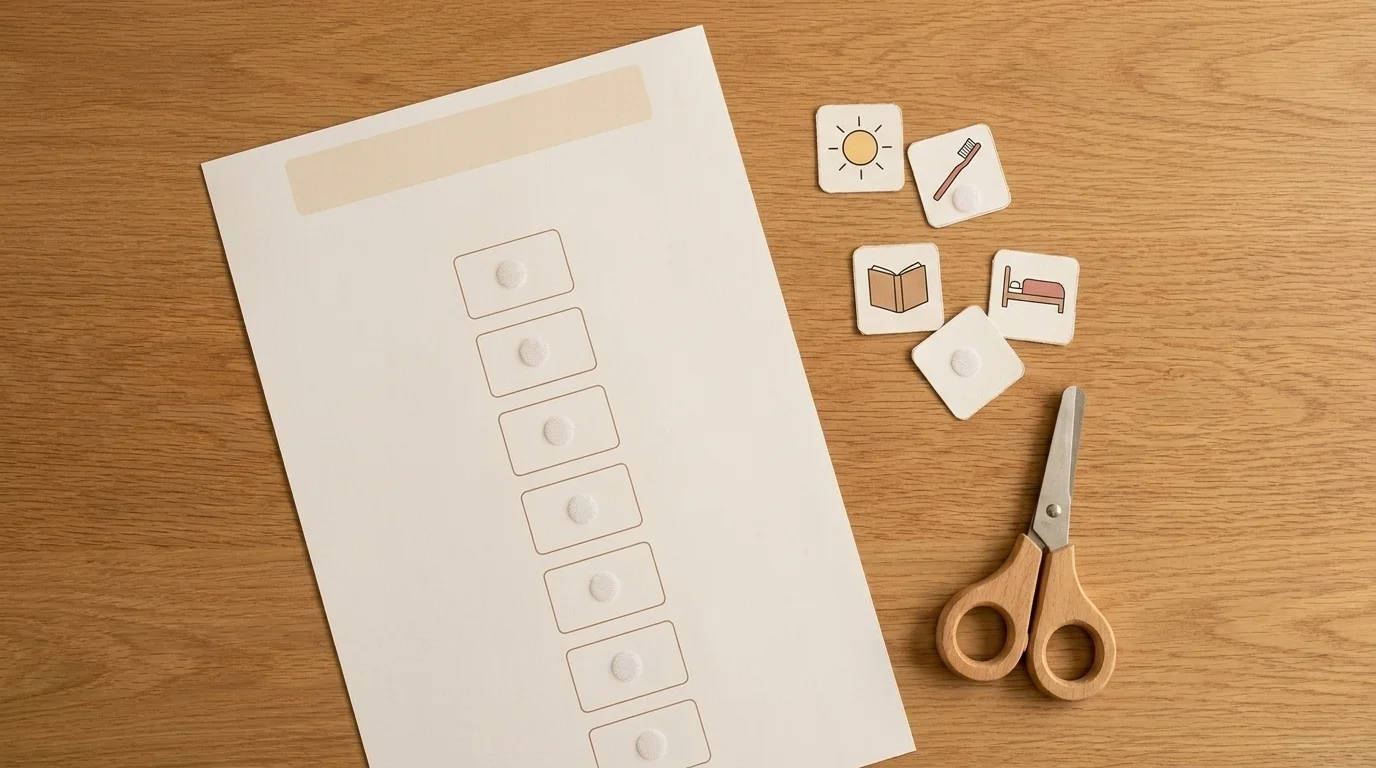
The choice between a printed schedule and an app is easy to make on instinct, and instinct is a poor guide here, so let me give you a rule instead.
Printables are low-tech, cheap, and — underrated, this — free of distraction. Nothing on a laminated strip pings, updates, or offers a game. They are easy for an adult to model and easy for a young learner to touch, which makes them strong for the early and classroom years. (An example printable you can adapt is worth more than any number of paragraphs; the template above is the kind of thing to start from.)
Digital and app-based schedules are portable, discreet, and capable of self-managed reminders that do not require an adult in the room. For a secondary student building toward independence and job-readiness, a schedule that lives on the same phone as everyone else's calendar is not a special accommodation — it is ordinary adulthood, arrived at early.
The decision rule: choose by the learner's independence goal and distraction profile, not by novelty. A quiet caution on the printables question specifically — the market for free templates and PDFs is enormous and largely owned by tool builders and template marketplaces. Use those assets freely; the point of this guide is the teaching around them, not a race to out-print a schedule builder.
Troubleshooting and Fading to Independence
This is the section the other guides skip, and it is the one that decides whether a schedule becomes a working intervention or an expensive wall decoration. So let me take the two halves in turn: what to do when it is not working, and how to fade it once it is.
When a schedule fails, diagnose before you redesign. Three faults are worth ruling out first, each the mirror image of one of the steps above: the representation level does not actually fit the learner (you built a picture schedule for a student who needs objects); the schedule is drowning in verbal prompts, so the adult, not the card, is still running the day; or the schedule was posted but never taught — hung on the wall as though its meaning were self-evident. It rarely is.
Two failure modes deserve to be named plainly and then normalized. Prompt-dependence — the student who follows the schedule beautifully but only with an adult narrating each step — is a recognised risk rather than a freak result: AFIRM's prompting guidance warns that "failure to appropriately fade prompts can cause the learner to become prompt dependent." So before you conclude the tool has failed, it is worth asking whether the fade was ever started — while leaving the fit question above genuinely open, because both can be true of the same child at once. And a plateau is not a verdict. A schedule that stops producing gains has not necessarily stopped working; the plateau may be marking the edge of what the current level of support can teach, which is information, not defeat. Where a student refuses, I would look at motivation before compliance: revisit what the "then" is worth to them, and check that the "change" card is doing its job.
This is where the 2025 finding I mentioned earlier stops being an academic footnote. The evidence base does not describe schedules working alone; NCAEP's own definition notes that visual supports "are often combined with other practices such as prompting and reinforcement." What the research cannot yet tell us is how much of the benefit belongs to the card itself. What it does tell us is that the teaching around the card was never the optional part. The fade is not the epilogue to the story. It is the plot.
How to Fade Prompts Systematically
Here I want to report something I went looking for and did not find: there is no official ladder to recite. The AFIRM Visual Supports packet gives exactly one instruction on fading — "Fade prompts as quickly as possible when criterion met" — and one reason for it: by fading quickly, "adults will teach learner on the spectrum not to rely on adult prompts but rather use the visual supports independently." That is the whole rule. The sequence is yours to build.
What AFIRM supplies is the kit for building it. Its Prompting packet names five kinds of prompt — gestural, verbal, visual, model, and physical — and says plainly that "the hierarchy can be different depending on the needs of the student and the type of goal." Where a hierarchy is written down, AFIRM asks for at least three levels, two of them fixed points: an independent level with no prompt at all, and a controlling prompt — the one that reliably gets the student there. Reinforcement follows the correct response.
So the honest instruction is not "recite the standard rungs," because there are none to recite. It is: choose your prompts from those five, order them for this student and this transition, put independence at one end and your controlling prompt at the other, reinforce the response you want, and withdraw support as fast as the student's own data lets you. A word on limits, because this is a caregiving decision and not only a technical one: these strategies complement, but do not replace, the individualized judgment of a student's educational and clinical team. If a schedule keeps failing after an honest diagnosis, that is a signal to bring the team in — the teacher, the speech-language pathologist, the behavior specialist — rather than to push the same tool harder. Working with executive functioning and independence is a long game, and it is worth reading alongside supporting executive functioning and independence.
Conclusion
Strip everything back and the argument is simple. A visual schedule for students with autism belongs to visual supports — the category the 2020 NCAEP review classifies as an evidence-based practice, effective across the full zero-to-twenty-two span — and its real gift is not the poster on the wall but the map it hands to the student, so the day becomes something they can see and eventually run themselves. The win is the fade: the schedule paired with prompting and reinforcement along the way, and then, patiently, withdrawn until the learner is holding the map alone. Agency, predictability, autonomy — in that order.
If you are starting tomorrow, start small. One first-then board, one student, one transition that has been going badly. Download or sketch a single strip, teach it rather than post it, and plan the fade from the first day. And if you want the wider frame — autism, learning, and the ordinary dignity of running your own day — the rest of horizonsmind's education and autism writing is here for it.
Frequently Asked Questions
Visual schedules can absolutely be used with high school students — the format simply matures with the learner. The evidence base reports visual supports as effective across the full zero-to-twenty-two span, and at secondary level written checklists, planners, or digital app schedules carry life-skills, job-readiness, and self-management goals, looking far more like the ordinary organizers every adult uses than like a childhood accommodation.
A child can start remarkably early. The evidence base shows visual supports are effective across the full zero-to-twenty-two age span, which means the youngest, pre-symbolic learners can begin with object or first-then formats long before they read. The trick is not the age but the representation: match the schedule to the comprehension level the child is actually standing on, and start short.
Visual schedules are used with many students with disabilities beyond autism, not only with autistic learners. Any learner who benefits from predictability and a reduced verbal demand may find one useful, and the same design principles are the place to start: match the representation to the learner, make it portable, teach it rather than post it, and fade toward independence.
Free printable visual schedules are widely available from template marketplaces and classroom-resource sites, and adapting one is a fine place to start. But treat a printable as a starting point rather than a finished tool: match the picture or written cards to the specific learner's comprehension level — the decision everything else depends on — then adjust as they grow.
Students can become prompt-dependent on a visual schedule — following it beautifully, but only with an adult narrating each step. AFIRM's prompting guidance warns that failing to fade prompts appropriately can cause exactly this. There is no fixed ladder to recite: build a prompt hierarchy around the learner, reinforce the correct response, and fade as soon as criterion is met.
Check Out These Related Articles

Learning Adventure: Creative Educational Approaches to Cater to Autistic Childrens Diverse Learning Styles

Inclusive Playtime: Creating Supportive Environments for Autistic Children

Educational Strategies for Autistic Children: Unlocking Potential in the Classroom